
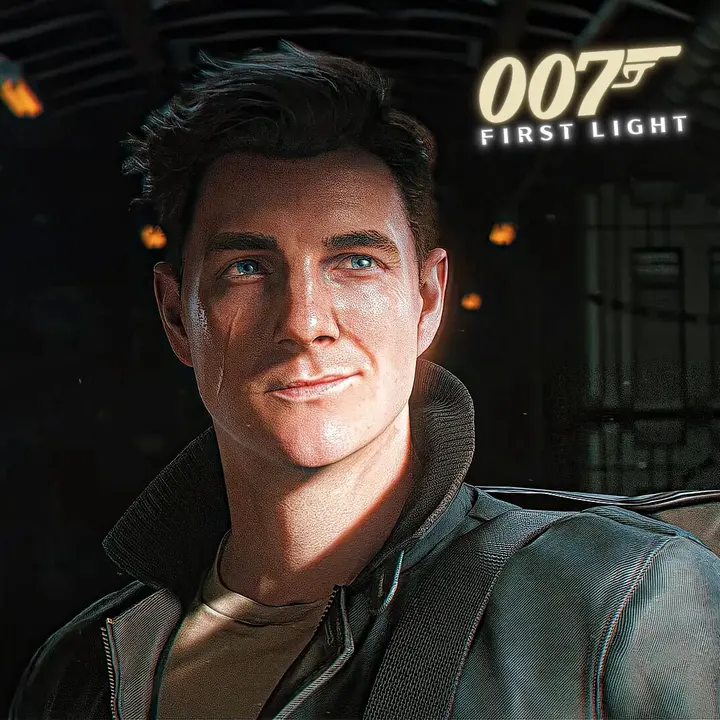
James Bond Scene Pack | 007 First Light (Part 01)
Be sure to subscribe and follow my social media accounts

Introduction
Finding clean, high-bitrate clips for cinematic spy thrillers and action montage edits is often a struggle. Intrusive watermarks, hardcoded subtitles, and heavy stream compression quickly strip away the glossy, high-production atmosphere needed for top-tier edits.
The James Bond Scene Pack Part 01 (007 First Light) solves that problem completely. This pack delivers an exclusive, curated collection of pristine footage focusing on the origins, high-octane chases, and sleek espionage sequences of the 007 universe in First Light.
Whether you make fast-paced phonk edits on TikTok, atmospheric Instagram reels, or cinematic YouTube story tributes, this pack provides all the signature espionage moments without visual clutter. From sharp tuxedo walkouts and intense silenced-pistol shootouts to high-speed vehicle pursuits and tense interrogation close-ups, every clip is cut to give you maximum editing freedom.
Curated specifically for video editors and action content creators, this pack lets you jump straight into syncing beat drops, designing speed ramps, and color grading without wasting hours hunting down and cleaning raw video files.
What’s Included in This Pack
The pack holds a set of James Bond clips from 007 First Light. The clips are arranged to make editing simpler and faster.
Pack Contents
- 20+ James Bond scenes
- High‑quality. Movie‑style moments
- Many clip variations for editing styles
- Good for short and long videos
- Clean footage with no distracting overlays
Included Versions
- Normal Clip Version
- Quality: 1080p FHD
- Original quality footage
- File Size: 299 MB
- Topaz Clip Version
- Quality : 2K
- Enhanced with Topaz Video AI
- Sharpness and detail
- File Size: 340 MB
- CC Clip Version
- Quality : 2K
- Color‑corrected footage
- Ready for editing projects
- File Size: 338 MB
Technical Details
- Game: 007 First Light
- Character: James Bond
- Total Scenes: 20+
- Resolution: 1080p + 2K
- Duration: 03:00 Minutes
- Formats Included: Normal, Topaz, and CC Versions
The pack gives editors freedom when making videos. Those who want control can use the Normal clips while editors who need sharper visuals can use the Topaz version. The CC version saves time by giving clips that already look polished.
Key Features
Why Use This Scene Pack?
- High-Quality Clips
- Footage available in FHD + 2K resolution.
- Multiple Versions Included
- Choose between Normal, Topaz and CC clips.
- Topaz Enhanced Footage
- detail and clarity for cleaner edits.
- Color Corrected Clips
- CC version provides an improved look.
- Editing Friendly
- Easy to use in After Effects, Premiere Pro, DaVinci Resolve and other software.
- Perfect for Gaming Edits
- Designed for character edits, cinematic projects and social media content.
- No Watermark
- footage for a professional editing workflow.
- Organized Content
- Clips are arranged for access and faster editing.
These features make the pack useful, for both beginners and experienced editors who need James Bond footage without spending time gathering clips by hand.
How to Use This Scene Pack
Using the James Bond Scene Pack I 007 First Light I Part 01 is easy. Follow the steps to begin your edit.
1. Download the Pack
Download the version you want. You can pick the Normal, Topaz or CC version based on your editing needs.
2. Import Into Your Editing Software
Open your editing software such as:
- Adobe After Effects
- Adobe Premiere Pro
- DaVinci Resolve
- Sony Vegas Pro
- CapCut
Start a new project and bring in the downloaded clips.
3: Add Clips to the Timeline
Take the clip from your media library. Drag them onto the timeline. Position them in the order that matches your story or the style you want.
4: Cut the Scenes You Need
Remove any parts you don’t need. Keep the best moments to keep your edit fast and exciting.
5: Add Effects and Transitions
Use effects, like:
- Motion blur
- Zoom effects
- Glow effects
- Flash transitions
- Camera shakes
You can also time your scene changes to match music beats for a more dynamic edit.
6: Export Your Final Edit
Once your project is done export the video with high-quality settings.
Recommended export settings:
- Resolution: 2K
- Format: MP4 (H.264)
- Frame Rate: Match the source footage
- Bitrate: High Quality
Your James Bond edit will be ready to share on YouTube, TikTok, Instagram or any other platform.
Tips for Best Results
- For the outcome from this scene pack remember these tips.
- Export your project at a bitrate to keep video quality and sharp details.
- Make sure your project frame rate matches the source footage. Mixing rates can cause stuttering.
- Many visual effects can clutter an edit. Stick to clean transitions and smooth motion.
- Topaz clips perform better when used in slow‑motion sequences.
- Organize clips before editing. This saves time. Improves workflow especially on longer projects.
- Follow these tips to create smoother and more professional edits.
Following these simple practices can significantly improve the overall quality of your edits.